Multi-cluster architectures for large deployments
Evaluate multi-cluster architectures for Che deployments that exceed single-cluster capacity, and review the Developer Sandbox reference implementation that routes developers across clusters automatically.
Workloads distributed across multiple clusters
By design, Eclipse Che is not multi-cluster aware. You can only have one instance per cluster.
However, you can run Eclipse Che in a multi-cluster environment by deploying Eclipse Che in each cluster. Use a load balancer or Domain Name System (DNS)-based routing to direct traffic to the appropriate instance. This approach distributes the workload across clusters and provides redundancy in case of cluster failures.
Developer Sandbox that runs Dev Spaces across clusters
You can test running Che in a multi-cluster environment by using the Developer Sandbox, a free trial environment by Red Hat.
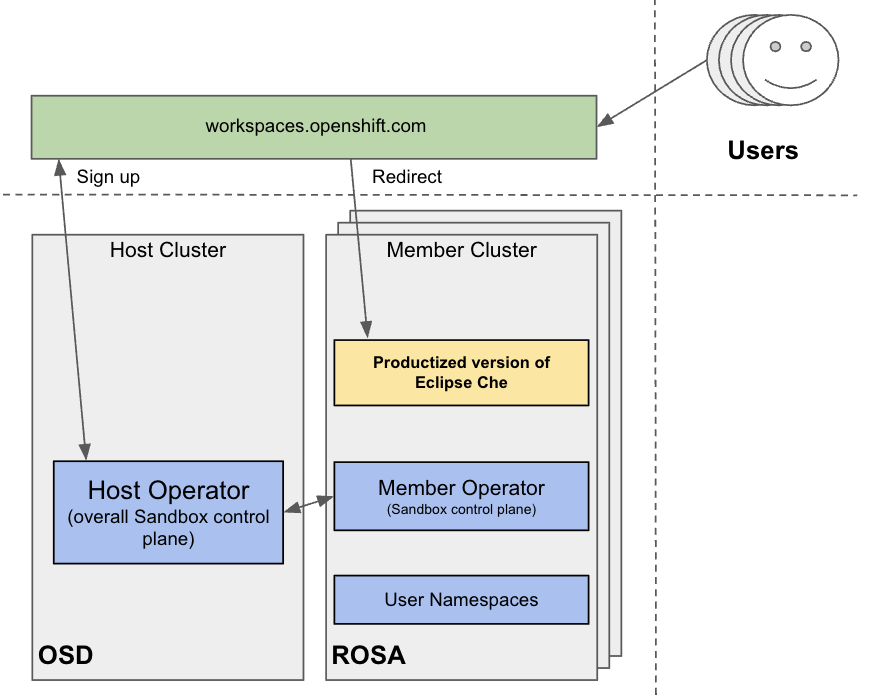
From an infrastructure perspective, the Developer Sandbox consists of multiple Red Hat OpenShift Service on AWS (ROSA) clusters. On each cluster, the productized version of Eclipse Che is installed and configured using Argo CD. The workspaces.openshift.com URL is used as a single entry point to the Eclipse Che instances across clusters.
|
The multi-cluster architecture of workspaces.openshift.com is part of the Developer Sandbox. It is a Developer Sandbox-specific solution that cannot be reused as-is in other environments. However, you can use it as a reference for implementing a similar solution well-tailored to your specific multicluster needs. |
Redirector that routes developers to the correct cluster
Red Hat offers an open source, Quarkus-based service that acts as a single gateway for developers. This service automatically redirects users to the correct Eclipse Che instance on the appropriate cluster based on their OpenShift Container Platform group membership. For the community-supported version, see Additional resources.
Prerequisites for the multicluster redirector
A critical requirement for the multicluster redirector is that all users are provisioned to the host cluster where the redirector is deployed. Users authenticate through the OAuth flow of this cluster, even if they never run workloads there. The host cluster’s OpenShift Container Platform groups determine the routing logic. For deployment instructions, see Additional resources.
OpenShift groups that map to cluster URLs
The routing configuration uses a ConfigMap that contains JSON to map OpenShift Container Platform groups to Eclipse Che URLs. The redirector uses this file to update routing tables in real-time without requiring restarts.
Authentication and routing steps
The routing process follows these steps:
-
Authenticate by using OAuth through a proxy sidecar.
-
Pass identity and group information through HTTP headers.
-
Verify group memberships by using OpenShift Container Platform API queries.
-
Determine the appropriate Eclipse Che URL by using a mapping lookup.
-
Redirect the user to the designated cluster instance.
If users belong to multiple OpenShift Container Platform groups, they can choose the Eclipse Che instance they need from a selection dashboard.